From Tribal Knowledge to Scalable Operations
Completed under NDA. Company, product, and proprietary implementation details have been anonymized. Supporting images have been recreated to depict similar environments, equipment, and workflows but do not reproduce the original photographs or proprietary materials.
Lead Product Designer
Discovery • Product Strategy • Workflow Design • Information Architecture • Design QA
Enterprise Inventory & Operations Platform
Industrial Manufacturing & Materials Processing
Operations • Production • Quality • Operations Leadership
Product Manager,
Engineering, Client Stakeholders
2023–2024
Business Impact
Discovery redirected the project from a legacy software replacement to an operational platform designed around how work actually happened across inventory, production, and downstream operations.
83%
Faster inventory processing
87%
Fewer manual data entry errors
80%
Faster Employee Onboarding
Table of Contents
Overview
Executive Summary
Challenge
Replace a legacy inventory platform that no longer reflected how inventory operations actually worked.
Role
Led discovery and product design from contextual research and workflow mapping through information architecture, interaction design, implementation support, and design QA.
Product Direction
Recommended redesigning the platform around warehouse operations rather than modernizing the legacy application.
Outcome
• 83% faster inventory processing
• 87% fewer manual data entry errors
• 80% faster employee onboarding
Business Context
Replacing Legacy Software
A confidential industrial recycling company needed to replace an aging inventory platform that served as the operational entry point for incoming inventory.
Every item entering the business passed through this workflow before moving into downstream operational systems. Because the platform served as the starting point for inventory data, problems during intake affected every stage that followed.
The original objective was to modernize the legacy application, simplify warehouse workflows, and create a platform that could support future growth. Like everyone else on the project, I expected to redesign the interface.
Discovery
Understanding the Work Before Designing the Software
The original plan was to review the existing platform, discuss requirements with stakeholders, and begin redesigning the interface.
Before making product decisions, I wanted to understand how inventory actually moved through the warehouse.
I needed to understand the work before redesigning the software.
Gaining Access to the Work
My initial request to interview and shadow warehouse employees was declined. Leadership believed the existing process was already well understood and that discussions with stakeholders would provide the information needed to redesign the platform. Pulling employees away from production also introduced operational concerns the team wanted to avoid. Rather than pushing for formal interviews, I proposed a smaller request. I asked for permission to observe employees as they worked, document recurring patterns, and ask questions without interrupting production. That compromise was approved.
Observing Warehouse Operations
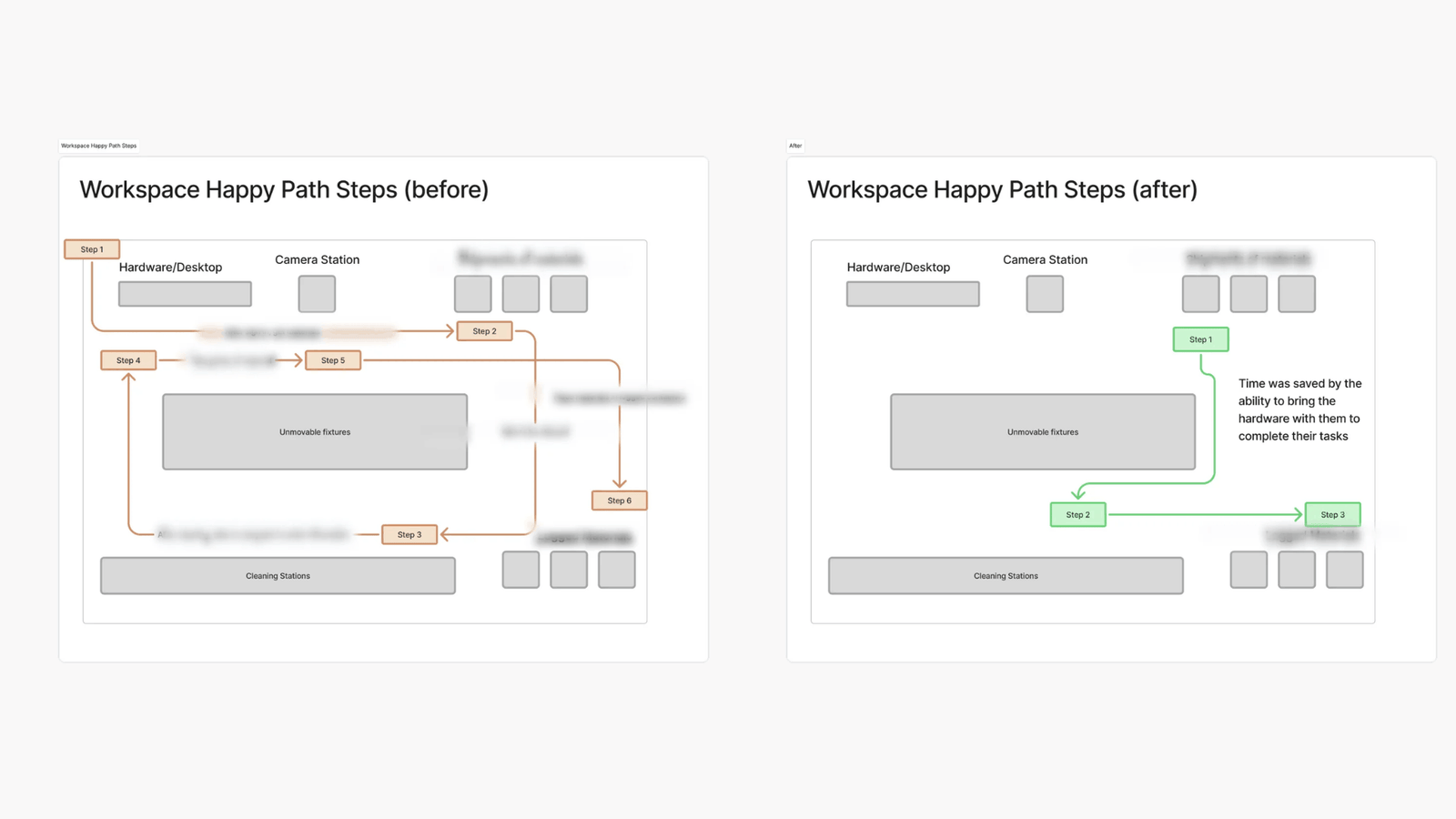
I followed inventory as it moved through receiving, cleaning, photography, identification, documentation, laboratory analysis, and production to understand how work extended beyond the software itself. The warehouse shaped nearly every interaction. Employees moved continuously between workstations while balancing production demands with accurate inventory records. The application assumed work happened at shared desktop computers. The reality was very different. Routine tasks required employees to leave their work, return to a workstation, enter information, and then walk back to continue processing inventory. Every interruption slowed inventory intake and created additional opportunities for inconsistent data flowing into downstream systems. As I continued observing the work, another pattern emerged. The application reflected years of accumulated requests from multiple departments instead of supporting a cohesive operational workflow. Warehouse employees regularly encountered laboratory features, reporting tools, and administrative functionality that had little relevance to inventory intake. Experienced employees moved through the workflow almost instinctively. Newer employees hesitated. When they became uncertain, they rarely turned to the software for answers. They turned to another person. Operational knowledge existed almost entirely in the heads of experienced employees rather than inside the product itself. The more I observed the work, the more apparent it became that the challenge was not simply replacing an outdated application. The product needed to better support the way warehouse employees actually worked.
The Turning Point
We Were Solving the Wrong Problem
During one observation session, the application became difficult to use. Instead of continuing, the employee reached for a sheet of paper and said,
“You know what… I’ll just show you what I normally do.”
That moment changed how I understood the problem.
Employees weren’t avoiding the application because they preferred paper; they had developed their own process because the software no longer supported the work they were trying to complete.
The application had become a place to document completed work instead of helping employees perform the work as it happened.
The project was no longer about modernizing an existing application. It was about redesigning the product around the way the work actually happened.
Product Strategy
Redesigning the Platform Around Warehouse Operations
After completing discovery, I reviewed the findings with the project manager.
The findings confirmed that continuing with the original plan would modernize the interface while preserving the operational problems we had observed throughout the warehouse.
Together, we presented the research to engineering and client stakeholders and recommended shifting the project from a software modernization effort to redesigning the platform around warehouse operations rather than the structure of the legacy application. That recommendation became the direction for the remainder of the project.
From that point forward, every product decision was evaluated against a single question:
Does this help warehouse employees perform the work more effectively?
The warehouse had already adapted around the software, the next step was redesigning the software to better support the warehouse.
Key Product Decisions
Supporting Work Where It Happened
Discovery identified recurring operational problems rather than isolated usability issues. Each design decision addressed patterns observed throughout the warehouse while balancing business priorities, engineering constraints, and long-term operational needs.
Observation
Warehouse employees spent most of their day moving with inventory, while the application assumed work happened at shared desktop computers. Every return trip interrupted inventory processing and delayed data capture.
Decision
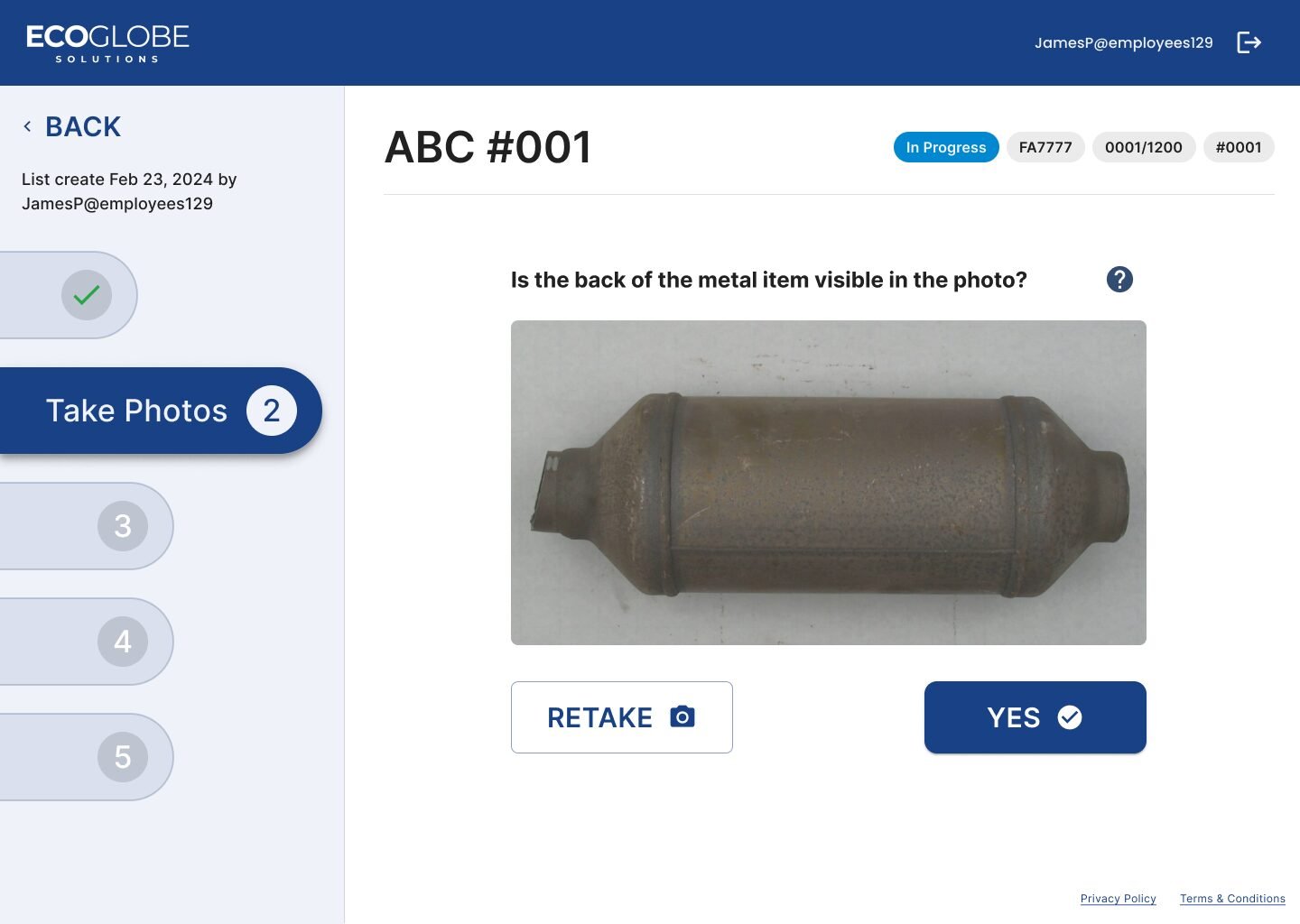
Redesign the workflow around rugged mobile tablets so employees could capture inventory information where the work happened instead of returning to desktop computers.
Tradeoff
Supporting mobile workflows required additional hardware investment and significant implementation changes, including workflow progression, validation logic, and downstream system behavior. Although it increased implementation complexity, it addressed the operational bottleneck identified during discovery.
Impact
Employees could capture information without leaving the workflow, reducing interruptions while improving the consistency of inventory data flowing into downstream systems.
Decision 2
Embedding Operational Knowledge
Observation
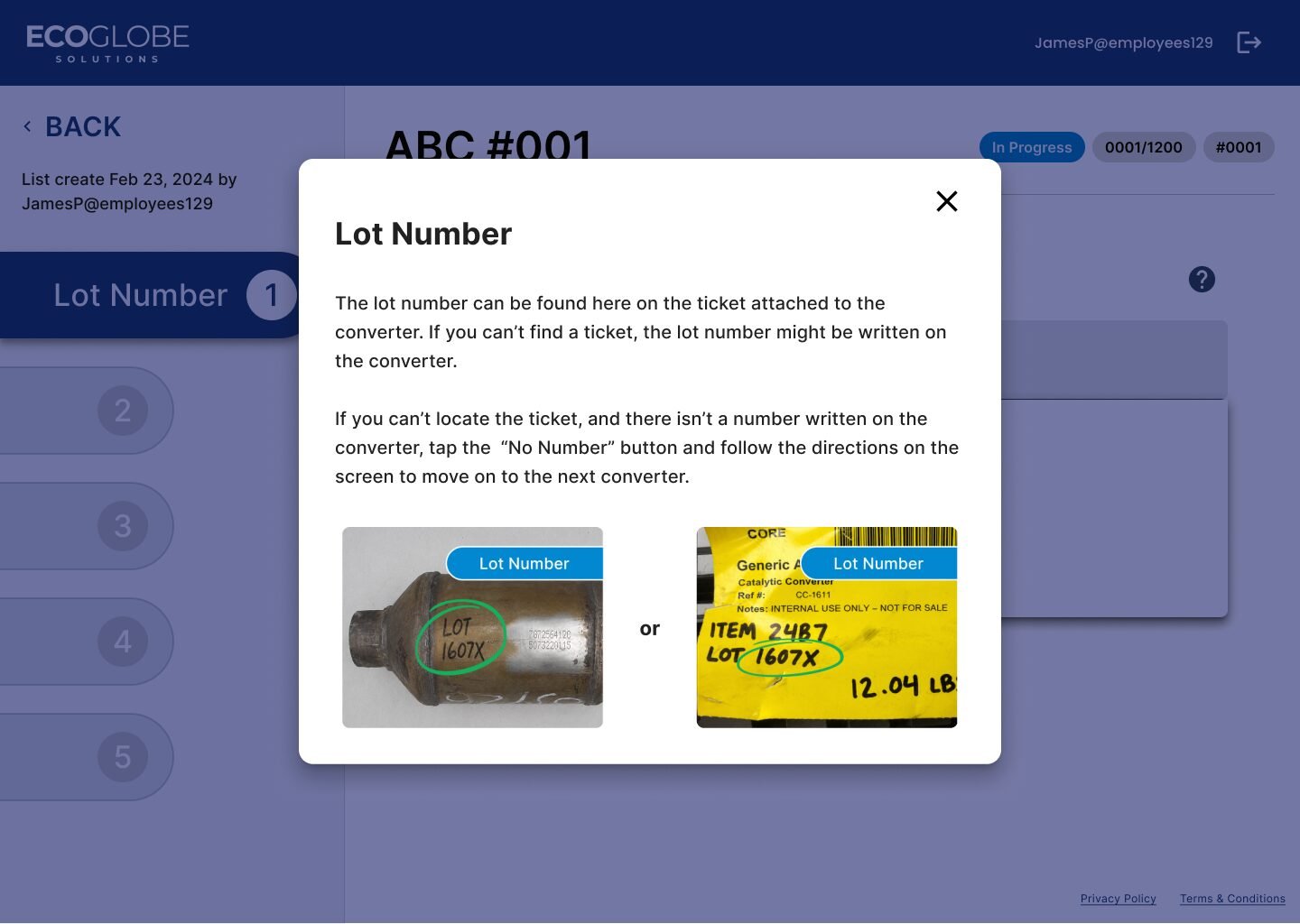
Employees regularly stopped work to ask experienced coworkers how to identify parts, locate serial numbers, or complete documentation because the information they needed was not available inside the product.
Decision
Embed contextual guidance, annotated reference imagery, and task-specific instructions directly into the workflow so employees could answer routine questions without leaving their work.
Tradeoff
Client stakeholders were concerned that making operational knowledge broadly available could expose proprietary information. Working with engineering, we introduced role-based permissions that balanced security requirements with the operational support employees needed
Impact
Operational knowledge became part of the product rather than remaining dependent on experienced employees, helping new team members work more independently while reducing interruptions.
Decision 3
Reducing Operational Complexity
Observation
Warehouse employees regularly encountered laboratory tools, reporting features, and administrative functionality that had little relevance to inventory intake, increasing cognitive load during routine tasks.
Decision
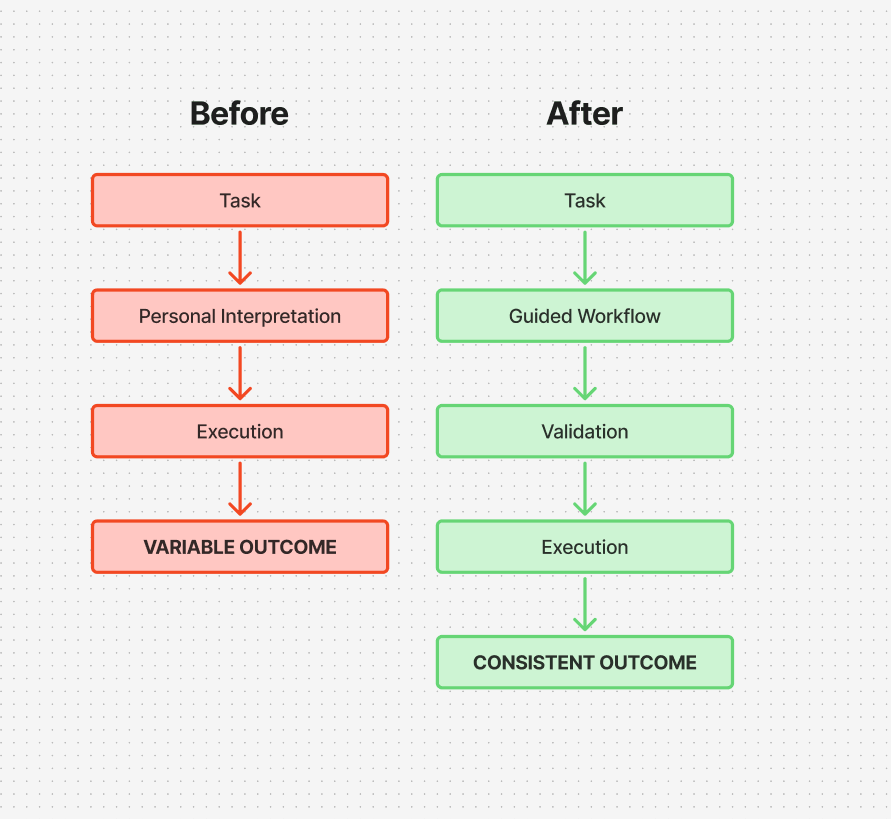
Reorganize the platform around operational tasks rather than departmental ownership, presenting only the information required to complete the current step before guiding employees to the next.
Tradeoff
This required redesigning the platform's navigation, information architecture, and interaction patterns instead of simply updating the existing interface.
Impact
Employees completed inventory intake with fewer unnecessary decisions, improving consistency while reducing cognitive load for both experienced and new employees.
Decision 4
Designing Operational System Behavior
Observation
Permissions, validation rules, and business logic had evolved alongside the legacy application instead of reflecting how inventory actually moved through warehouse operations.
Decision
Translate warehouse workflows into role-based permissions, validation rules, conditional logic, and system behavior that reflected operational reality rather than legacy application structure.
Tradeoff
Implementation required close collaboration with engineering and ongoing design QA to refine edge cases, workflow behavior, and validation rules before release.
Impact
The completed platform behaved consistently under real warehouse conditions, helping ensure accurate inventory data moved reliably into downstream enterprise systems.
Cross Functional Delivery
Translating Research Into Product Decisions
Building alignment
Before design work continued, I partnered with the project manager to translate our research into a revised product direction. Together, we presented the findings to engineering and client stakeholders, recommending that the platform be redesigned around warehouse operations instead of simply modernizing the legacy application. The recommendation challenged assumptions held at the start of the project. Engineering needed to rethink validation rules, while stakeholders evaluated whether the additional implementation effort justified changing direction. Building alignment around the operational evidence became just as important as designing the product itself. Without a shared understanding of the underlying problem, the team would have delivered a more modern interface while preserving the same operational challenges.
Working With Engineering
Engineering became an active design partner throughout implementation. As workflows evolved, we worked together to translate warehouse operations into permissions, validation rules, conditional logic, and system behavior that reflected how inventory actually moved through the business rather than how the legacy application had been structured. Design reviews focused less on visual polish and more on ensuring the platform behaved correctly as inventory moved through each stage of the workflow. That collaboration continued throughout implementation as new operational edge cases emerged.
Implementation & Design QA
Implementation became a continuous feedback loop rather than a traditional design handoff. Design QA regularly uncovered operational edge cases that required refining workflows, permissions, validation logic, and interaction behavior before release. Working through those scenarios with engineering helped ensure the completed platform behaved consistently under real warehouse conditions instead of simply matching the original specifications.
Key Takeaway
This project reinforced how I approach enterprise product design. Helping teams align around the right problem often creates more value than refining the interface that follows.
Outcomes
What Changed
The product ultimately solved a different problem than the one the project originally set out to address.
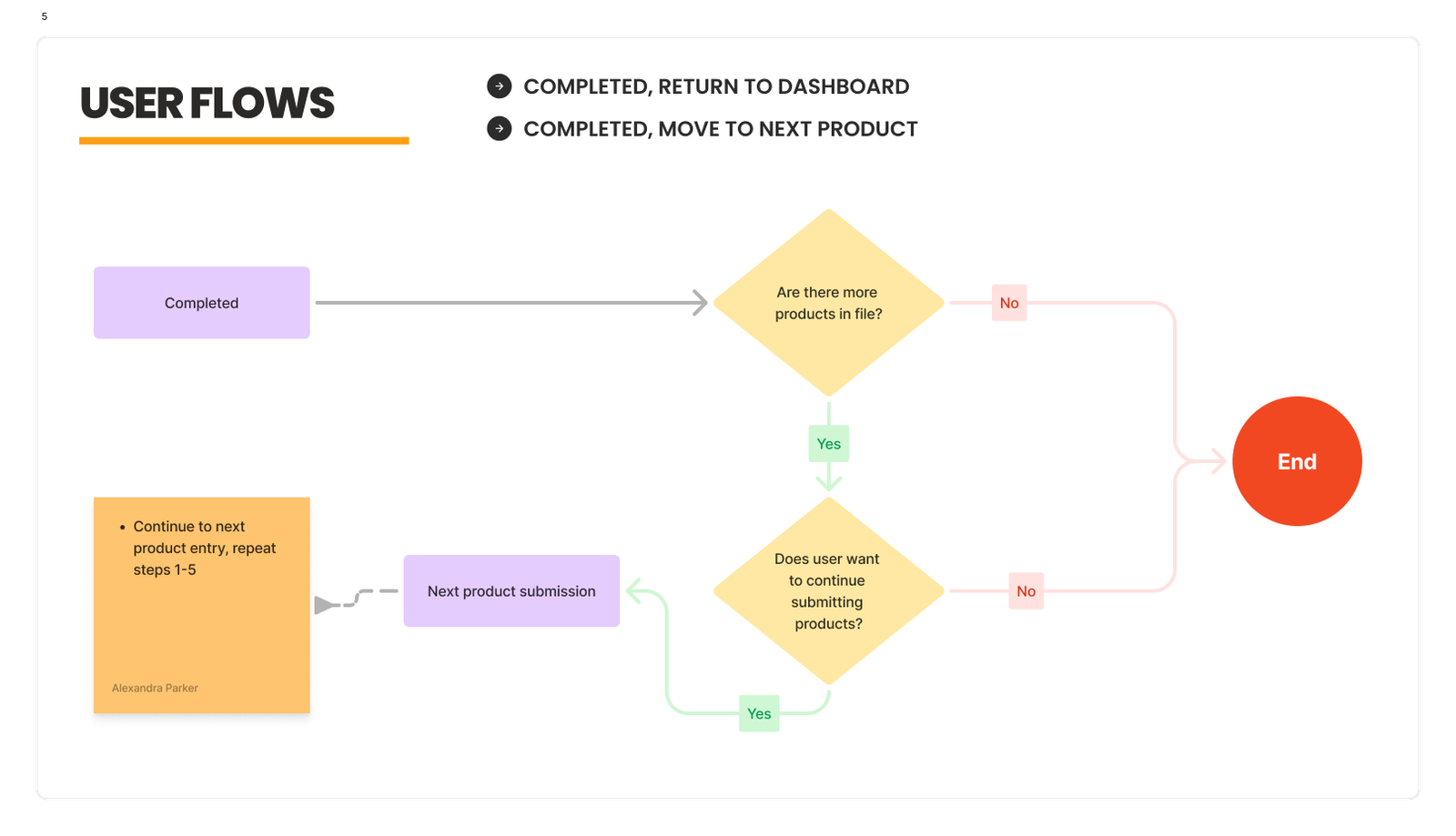
Instead of modernizing a legacy application, the platform was redesigned around how inventory moved through warehouse operations. The completed product became the operational starting point for incoming materials, helping teams capture more consistent information before it moved into downstream systems.
83% Faster Inventory Processing
Supporting work where it happened reduced unnecessary movement throughout warehouse operations.
87% Fewer Manual Data Entry Errors
Simplified workflows and improved validation increased the consistency of inventory data flowing into downstream systems.
80% Faster Employee Onboarding
Embedding operational knowledge throughout the workflow helped new employees become productive more quickly while reducing reliance on experienced coworkers.
Client reported outcomes after implementation.
The results reinforced the value of designing around operational workflows. The platform better supported employees while improving the consistency of information flowing through downstream systems.
Reflection
How This Project Changed My Approach
When this project began, the goal appeared straightforward: redesign an aging inventory application. The initial assumption was that the primary challenge was the software itself.
Spending time in the warehouse changed that perspective.
The people doing the work had already adapted around the limitations of the product. Experienced employees relied on years of accumulated knowledge. New employees relied on experienced employees. When someone became uncertain, they rarely looked to the software for answers. They looked to another person.
The product wasn’t missing features. It was missing the operational knowledge employees needed to make decisions while doing their jobs.
Once that became clear, the design direction changed. The goal was no longer just to improve the interface. It was to move critical operational knowledge into the product so employees could complete their work with less dependence on individual experience.
Looking back, that became the most important outcome of this project.
The platform was redesigned, but the larger change was creating a system that could preserve and share operational knowledge instead of leaving it with the people who happened to have it.